

How to Audit Recurring Subscriptions and Digital Tool Costs
A recurring subscription can be useful for months and then quietly become irrelevant. The price may rise, a free alternative may become sufficient, the original project may end, or the person who opened the account may stop using it. The payment continues because renewal is automatic, not because anyone made a fresh decision.
That is why a subscription audit is different from a general spending review. When you audit recurring subscriptions, you are not only asking, ‘Can I afford this charge?’ You are checking what the service does, who uses it, what it costs over a full year, which data or work depend on it, when it renews, and what would happen if you left.
The goal is not to cancel everything. A tool that saves time, protects a website, supports customers, or replaces a more expensive process may be worth keeping. The problem is paying by habit when the purpose, owner, or value is no longer clear.
This guide provides a repeatable process for personal subscriptions, online business tools, and mixed-use services. It will help you build one reliable list, calculate the real cost, separate inconvenience from genuine dependency, and make a decision you can explain later.
Educational note:
This article provides general information. Contract, cancellation, tax, refund, and consumer-rights rules vary by service, country, account type, and purchase method. Check the current agreement and official guidance that apply to your situation.
Table of Contents
What a Subscription Audit Should Reveal
A useful audit should leave you with more than a total. It should show whether every recurring payment has a current purpose and a person responsible for it. It should also reveal future obligations that are not visible in this month’s bank balance, such as an annual renewal, a price change after an introductory period, or a plan that becomes more expensive when contacts, users, storage, or usage increase.
By the end of the review, each subscription should have a simple record:
- service name and account owner
- personal, business, or mixed-use category
- billing frequency, amount, currency, and tax treatment
- next renewal or notice deadline
- purpose and recent evidence of use
- important files, contacts, integrations, or permissions connected to the account
- decision and the date when that decision should be reviewed again
This record turns a vague feeling of ‘too many subscriptions’ into a manageable set of decisions. It also prevents the opposite mistake: cancelling a low-cost service without noticing that it holds important data, protects a website, or supports a workflow that would be expensive to rebuild.
Why Recurring Costs Are Easy to Miss
Recurring charges rarely arrive together. One service bills monthly, another annually, another through an app store, and another through a payment account that you do not check often. Some invoices include tax while others add it later. Currency conversion can change the final amount. A free trial may become paid, and an annual plan can disappear from attention for eleven months.
The payment name may also differ from the product name. A bank statement can show a parent company, payment processor, shortened merchant label, or app-store charge. If a team member or family member created the account, the renewal email may go to an inbox you do not normally monitor.
These small sources of friction explain why memory is not enough. A proper audit uses statements, invoices, account dashboards, and email records together. If you already follow the Loyalix guide to track your spending, the subscription inventory becomes a focused extension of that broader habit.
Build One Complete Subscription Inventory
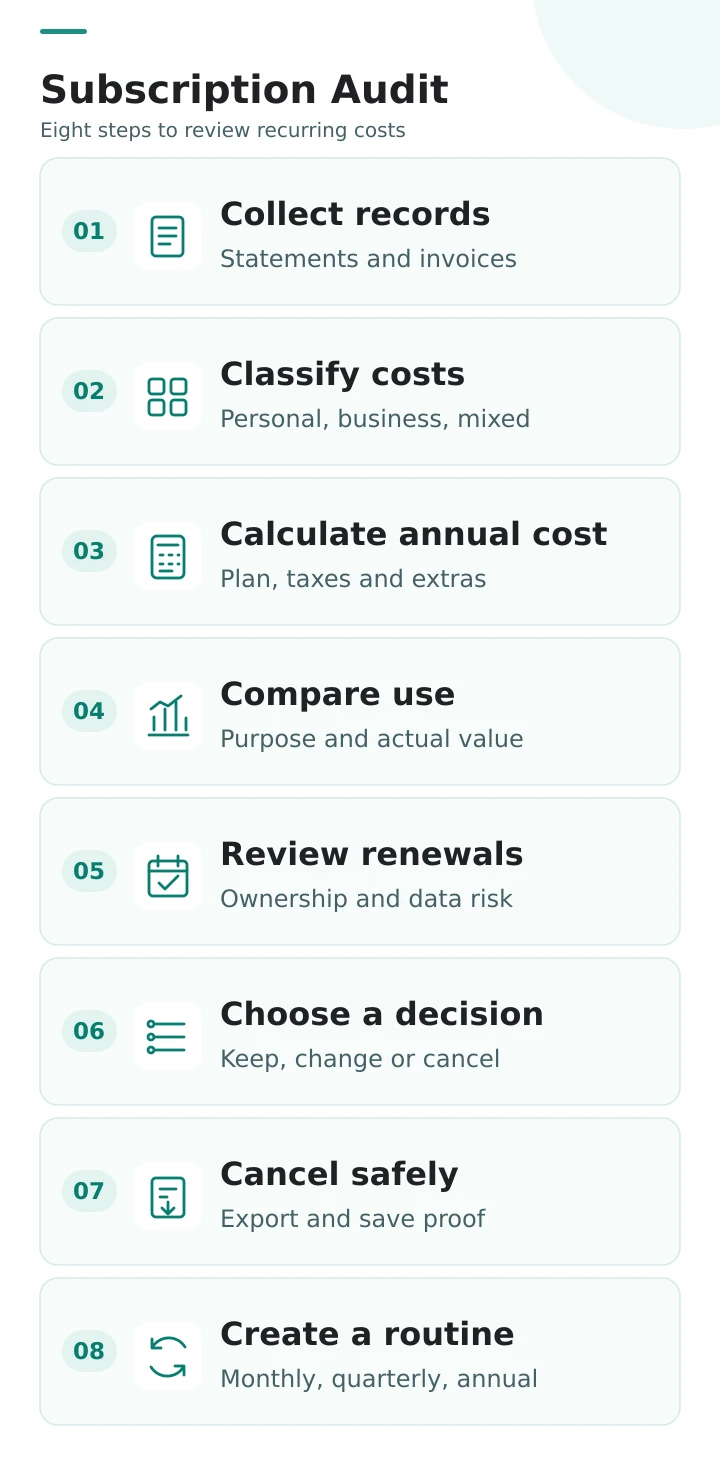
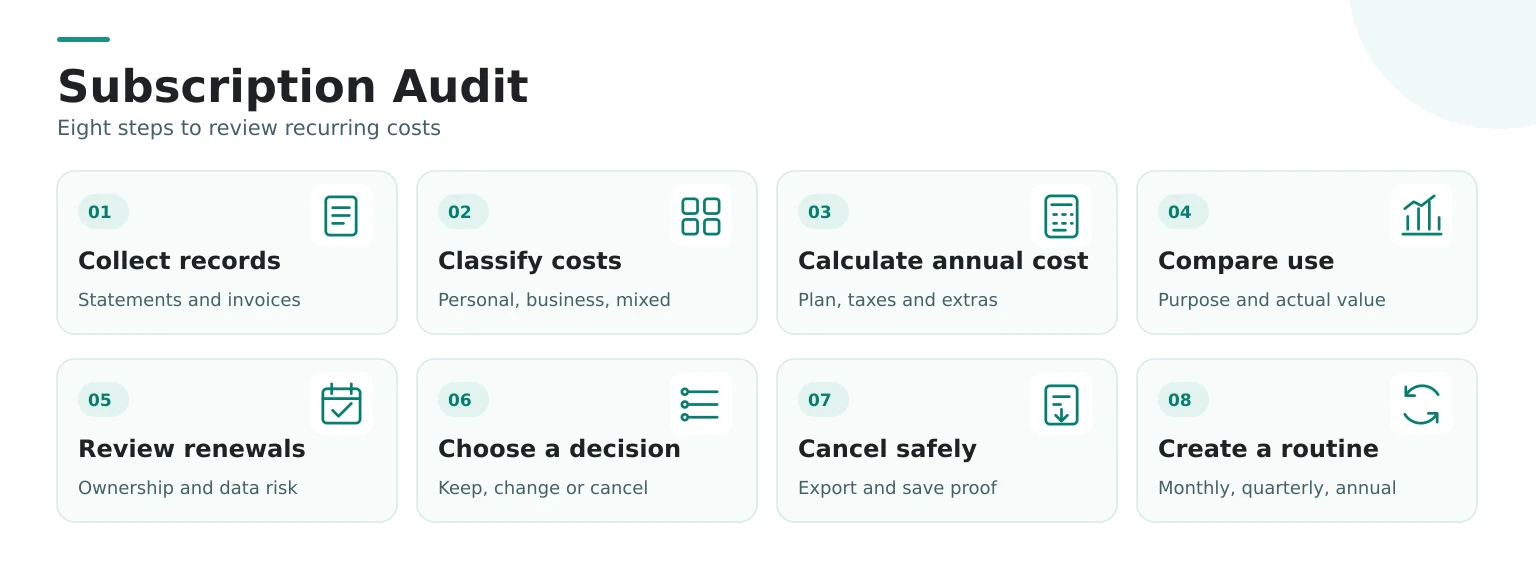
Start with one master list instead of separate notes on a phone, in email, and inside several payment accounts. The list can be a spreadsheet, a document table, or a secure finance app. The format matters less than completeness and regular review.
Include services that may not look like entertainment subscriptions. Website hosting, domain renewals, email platforms, cloud storage, security tools, design software, accounting apps, learning memberships, mobile apps, professional associations, and premium account features can all create recurring costs.
Do not remove a line simply because the amount is zero today. A free trial, promotional plan, or temporarily paused service can still create a future charge. Keep it in the inventory with the conversion or restart date.
| FIELD | WHAT TO RECORD |
|---|---|
| Service | Product name, merchant name, and account URL |
| Owner | Person or business responsible for the account, plus the email address that controls it |
| Billing | Monthly, annual, usage-based, or another schedule |
| Cost | Amount, currency, taxes, fees, and expected annual total |
| Renewal | Next charge date, notice deadline, and price-change date |
| Purpose | The job the service is expected to perform |
| Dependency | Files, contacts, integrations, permissions, or workflows that rely on it |
| Decision | Keep, downgrade, pause, replace, cancel, or investigate |
| Evidence | Cancellation confirmation, invoice, export, or next-review date |
Step 1: Collect Statements, Invoices, and Account Records
Review enough history to capture annual and irregular renewals. Twelve months is a practical minimum; a longer range may be necessary if some plans renew every two years or were recently paused. Check the payment sources you actually use, not only your main bank account.
Look in:
- bank and credit-card statements
- PayPal or other payment-service activity
- Apple, Google, Microsoft, or other app-store subscriptions
- email searches for invoice, receipt, renewal, subscription, trial, payment, and plan
- website and software dashboards
- business bookkeeping records and expense reports
When a statement label is unclear, search the exact merchant text and compare the amount and date with invoices. Do not assume an unfamiliar charge is fraudulent before checking whether it belongs to a known service under a different billing name. If a charge remains unexplained, contact the payment provider through its official channel.
Step 2: Separate Personal, Business, and Mixed-Use Costs
Classification matters because the same service can have different purposes. Cloud storage may hold family photos, client files, or both. A design tool may support paid work and personal projects. A phone app may be used by one person even though the business pays for it.
Use three labels: personal, business, and mixed use. Then record the actual owner and user. This is not the same as deciding whether an expense is tax-deductible. Tax treatment depends on local rules and facts, so keep a reliable record and ask a qualified professional when necessary.
Separating the categories also prevents business tools from disappearing inside a household budget. If you are building an online project, compare the inventory with the roles described in Website Tools for Beginners. Every paid tool should support a defined function rather than exist because it was once recommended.
Step 3: Calculate the Real Annual Cost
A monthly price is easy to underestimate. Multiply it by twelve, then add taxes, transaction fees, currency conversion, extra users, storage, add-ons, and predictable usage charges. For an annual plan, divide the total by twelve for a monthly comparison, but keep the actual renewal amount visible because that is what must be available on the billing date.
Expected annual cost = base plan + taxes + fees + add-ons + expected usage
Do not compare plans using promotional prices alone. Record when the introductory period ends and what the normal renewal price is expected to be. If the service charges in another currency, use the amount that actually reached your account and note that future conversion rates may change.
This calculation also helps you see the difference between a predictable fixed expense and a variable usage-based charge. The Loyalix guide to fixed vs variable expenses can help with that classification, but remember that even a fixed subscription still deserves review.
Step 4: Compare Purpose With Actual Use
A login count by itself is not a complete value test. Some services work quietly in the background. A backup tool may be valuable precisely because you rarely open it. A domain renewal protects an address. A security service may prevent problems rather than produce visible output.
Ask three different questions:
- Purpose: What specific job is this subscription supposed to perform?
- Evidence: What happened in the last 30, 90, or 365 days because the service existed?
- Alternative: What would replace that job if the subscription disappeared tomorrow?
For active tools, evidence may include work completed, hours saved, leads captured, files protected, messages sent, invoices created, or support received. For learning platforms, evidence may be completed lessons and applied skills. For entertainment, enjoyment is a valid purpose; the question is whether the cost still fits your priorities.
Avoid inventing a financial return that you cannot measure. A subscription doesn’t need to generate direct revenue to be useful, but its role should be clear enough that you can defend keeping it.
Step 5: Review Renewal, Ownership, and Data Risk
Cost is only one part of the decision. Before cancelling or changing a plan, check what the account controls. A subscription may store documents, mailing-list contacts, website backups, designs, invoices, analytics history, domain settings, or access credentials. A cheaper plan may remove export options, automation, storage, or team permissions.
Record:
- the account owner and recovery email
- who has administrator access
- important integrations and connected accounts
- what data can be exported and in which format
- what happens to stored data after downgrade or cancellation
- how much notice is required before renewal
- whether cancellation stops renewal immediately or only at the end of the paid period
If personal data are involved, export and deletion rights may depend on the applicable law and the type of data. The European Data Protection Board provides official guidance on the right to data portability. A practical audit should still begin with the service’s current export instructions and privacy documentation rather than assuming every type of account data can be transferred.
Step 6: Choose Keep, Downgrade, Pause, Replace, or Cancel
A subscription audit should end with an action, not a vague promise to think about the charge later. Use the smallest decision that solves the problem.
| DECISION | USE IT WHEN | CHECK FIRST |
|---|---|---|
| Keep | The purpose is current, and the value is clear. | Price, renewal date, owner, and next review. |
| Downgrade | You need the service but not the current limits or features. | Data limits, exports, integrations, and lost features. |
| Pause | The need is temporary, and the account can safely remain inactive. | Restart date, stored data, and pause fees. |
| Replace | Another service performs the same job with a better fit. | Migration effort, data portability, learning time, and overlap period. |
| Cancel | The purpose is gone, duplicated, or no longer worth the cost. | Export, dependencies, notice period, confirmation, and final charge. |
| Investigate | The owner, charge, contract, or impact is unclear. | Do not cancel until the uncertainty is resolved. |
If the main problem is whether a free or paid version is appropriate, use the separate Loyalix guide to free vs paid business tools. That decision should be based on real limits and workflow needs, not the pressure of a temporary discount.
Step 7: Cancel Safely and Save Evidence
Do not treat removing an app, deleting a bookmark, or taking a payment card out of an account as proof that a contract has ended. Follow the service’s official cancellation process and read what the confirmation actually says.
Before cancelling:
- export important files, contacts, reports, invoices, and configuration records
- identify integrations that may stop working
- transfer ownership if the account belongs to a team or business
- record the final service date and any remaining access period
- save the cancellation confirmation and relevant terms
- check the next statement for an unexpected charge
Refund and withdrawal rights depend on where you live, what you bought, when performance began, and the contract terms. In the EU, official guidance explains a 14-day cooling-off period for many distance contracts and lists important exceptions, including some fully delivered services and digital content. Review the current Your Europe withdrawal guidance and the rules for your country rather than assuming every subscription can be refunded.
If a charge continues after confirmed cancellation, contact the service through an official support channel and keep a dated record. If necessary, ask your bank or payment provider about its dispute or recurring-payment process. Do not share passwords or security codes with anyone claiming to help.
Step 8: Create a Review Routine
A one-time audit solves today’s clutter. A routine prevents the list from rebuilding quietly. Use a light monthly check and a deeper quarterly or annual review.
Monthly Check
Scan statements for new recurring charges, unexpected price changes, failed cancellations, and free trials that are about to convert. Update the inventory only when something changes. This should take minutes, not become another complicated financial system.
Quarterly Review
Revisit usage, purpose, owner, plan level, and upcoming annual renewals. Check whether two tools now perform the same job. Review subscriptions attached to projects that ended, team members who left, or websites that no longer exist.
Annual Planning Review
Add the expected annual total to your broader financial plan. Schedule larger renewals in advance and decide whether they still support the next year’s goals. The Loyalix one-year personal finance plan provides a natural place for this deeper review.
Recurring Subscription Audit Checklist
Use this checklist when reviewing personal subscriptions and digital tools:
12-point review
Check each item as you review your subscriptions and digital tools.
Common Subscription Audit Mistakes
Cancelling Only the Cheapest Services
A small charge may be useful, while a larger annual plan may have no current purpose. Review relevance and dependency before price alone. Ten small cancellations also may not justify the time and disruption if one unused major plan creates most of the avoidable cost.
Using Login Frequency as the Only Value Test
Background services, domains, backups, and security tools may be valuable without frequent logins. Define the job first, then look for appropriate evidence that the job is being done.
Ignoring Annual and Multi-Year Renewals
A monthly statement scan will not reveal every future obligation. Search a long enough history and record renewal dates before the notice window becomes too short.
Cancelling Before Exporting Data
A quick cancellation can create a larger loss if files, contacts, invoices, designs, or settings become unavailable.
Keeping a Tool Because Setup Took Time
Past effort is not a reason to keep paying forever. The relevant question is whether the tool still supports a current need and whether the future value justifies the future cost.
Switching Tools Without Counting Migration Costs
A cheaper subscription may require data cleanup, retraining, manual recreation, and a period of double payment. Record these transition costs before describing the replacement as a saving.
Assuming Cancellation and Refund Mean the Same Thing
Cancellation may only stop the next renewal. It may not refund the current period, and access may continue or end immediately depending on the terms. Read the confirmation and applicable consumer rules.
Final Thoughts
Recurring subscriptions are not automatically wasteful. They become a problem when the reason for paying is no longer visible, nobody owns the decision, or renewal happens before the cost and consequences are understood.
A calm audit replaces guilt with evidence. Find the charge. Name the purpose. Calculate the annual cost. Check what depends on the account. Then choose the smallest sensible action and keep proof that it was completed.
The most useful result is not the largest number of cancellations. It is a shorter, clearer list in which every remaining subscription has a reason to stay and a date to be reviewed again.
Frequently Asked Questions
How often should I audit recurring subscriptions?
Review new and unexpected charges monthly, then complete a deeper audit every three to six months. Annual plans should be reviewed before their notice or renewal dates, not after the payment appears.
How many months of statements should I check?
Twelve months is a practical minimum because it captures most annual renewals. Check a longer period when services renew every two years, were paused, or use irregular billing.
Should I cancel every subscription I do not use weekly?
No. Some valuable services work in the background, including backups, domains, security tools, and storage. Review the purpose and evidence that the service performs its job, not login frequency alone.
How do I calculate the true annual subscription cost?
Add the base plan, taxes, payment fees, currency conversion, extra users, add-ons, storage, and expected usage charges. Record the normal renewal price separately from any introductory discount.
What should I do before cancelling a digital tool?
Export important data, review integrations, transfer ownership when necessary, record the final access date, and save the cancellation confirmation. Check the next statement to confirm that billing stopped.
Is downgrading better than cancelling?
It can be when the service still has a clear purpose but the current plan includes unnecessary capacity or features. Check which exports, integrations, storage, and permissions would be lost on the lower plan.
Can I stop a subscription by removing my payment card?
Removing a card does not necessarily end the contract and may create a failed-payment balance. Use the service's official cancellation process and contact the payment provider if charges continue after confirmed cancellation.
Can I request a refund after cancelling?
Not automatically. Refund and withdrawal rights depend on the contract, purchase method, service status, country, and timing. Review the provider's current terms and the official consumer guidance that applies to you.
How should I track business subscriptions?
Record the account owner, business purpose, billing source, renewal date, data dependencies, integrations, invoices, and decision history. Keep tax records separately and ask a qualified professional about local treatment.